
Raspberry Pi Pico
Questi contenuti non sono ancora disponibili nella tua lingua.
The board as it appears on the Velxio canvas, with its full pin map
read live from the simulator (regenerated by scripts/gen-boards.mjs,
so it always matches what you can wire).
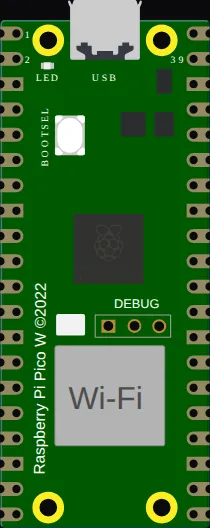
Family: Raspberry Pi Pico & Pico W · Languages: Arduino C++, MicroPython
About this board
Section titled “About this board”The standard RP2040 Pico: dual-core Cortex-M0+, emulated in the browser, with PIO — the programmable I/O blocks that make the RP2040 worth its price and that the NeoPixel and odd-protocol examples lean on.
MicroPython is this board’s native habitat here: the REPL comes up in the serial monitor and you can type at it while the sketch runs. Arduino C++ works too, through the earlephilhower core.
Start here
Section titled “Start here”New Raspberry Pi Pico project opens the editor with this board and a working blink sketch. The gallery has one of the deepest example sets in the catalog on this board — I2C scanner, SPI loopback, ADC, servo, ultrasonic, OLED, e-paper clocks, even a raycaster.
Pins (44)
Section titled “Pins (44)”- GP0
- GP1
- GND.1
- GP2
- GP3
- GP4
- GP5
- GND.2
- GP6
- GP7
- GP8
- GP9
- GND.3
- GP10
- GP11
- GP12
- GP13
- GND.4
- GP14
- GP15
- GP16
- GP17
- GND.5
- GP18
- GP19
- GP20
- GP21
- GND.6
- GP22
- RUN
- GP26
- A0
- GP27
- A1
- GND.7
- GP28
- A2
- ADC_VREF
- 3V3
- 3V3_EN
- GND.8
- VSYS
- VBUS
- GP25
Every pin above is clickable on the canvas — click one to start a wire. Board-level behavior, quirks and example links live on the family page.