
Raspberry Pi Pico W
Dieser Inhalt ist noch nicht in deiner Sprache verfügbar.
The board as it appears on the Velxio canvas, with its full pin map
read live from the simulator (regenerated by scripts/gen-boards.mjs,
so it always matches what you can wire).
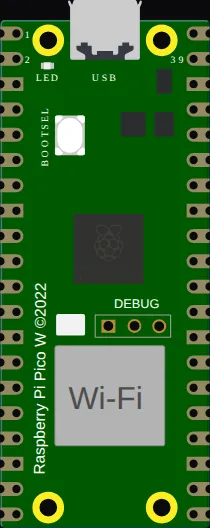
Family: Raspberry Pi Pico & Pico W · Languages: Arduino C++, MicroPython
About this board
Section titled “About this board”The Pico W is the Pico with the CYW43439 radio, and the radio is emulated rather than stubbed — the wireless stack really associates and your firmware sees a link come up.
Two levels, worth knowing before you plan a project:
- Joining a network runs in the browser and is free. The association, the driver handshake and the link state all work on any plan.
- Reaching the real internet is a paid feature. DNS, TCP and UDP out to actual hosts, and the inbound IoT gateway, are gated at run time — see plans.
Two Pico Ws can also talk to each other on one canvas; the gallery has handshake, GPIO mirror and UART passthrough projects built that way.
Start here
Section titled “Start here”No separate starter: open New Raspberry Pi Pico project and swap the board, or place it from Add Component.
Pins (44)
Section titled “Pins (44)”- GP0
- GP1
- GND.1
- GP2
- GP3
- GP4
- GP5
- GND.2
- GP6
- GP7
- GP8
- GP9
- GND.3
- GP10
- GP11
- GP12
- GP13
- GND.4
- GP14
- GP15
- GP16
- GP17
- GND.5
- GP18
- GP19
- GP20
- GP21
- GND.6
- GP22
- RUN
- GP26
- A0
- GP27
- A1
- GND.7
- GP28
- A2
- ADC_VREF
- 3V3
- 3V3_EN
- GND.8
- VSYS
- VBUS
- GP25
Every pin above is clickable on the canvas — click one to start a wire. Board-level behavior, quirks and example links live on the family page.