
Build a scene
A World made with Velxio’s scene kit (every World that Create a world for
this circuit makes, and the Devastator arena)
can be edited with the mouse. Changes are saved into world.html, so they go
wherever the project goes.
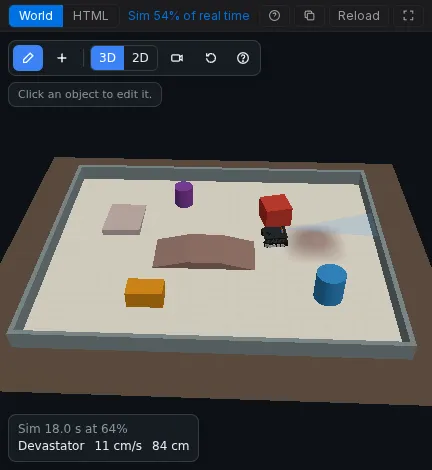
Edit mode
Section titled “Edit mode”Press Edit (the pencil) in the World’s toolbar.
-
Add places a new object on the mat:
Group Objects Robots Robot 2WD, Robot 4WD, Robot tank (Devastator), Robot arm Tracks Loop, oval, figure 8, straight (black tape on the mat) Obstacles Box, wall, cylinder Terrain Ramp, bridge, hill -
Click an object to select it and open its properties.
-
Drag to move it on the mat. Q and E rotate it, Shift rotates in 15 degree steps, Delete removes it.
-
Ctrl+Z and Ctrl+Y undo and redo.
-
Mat settings sets the mat size, colour and grid.
It works the same in the 3D and the 2D view. Press Edit again to go back to play mode.
Connect a robot to the circuit
Section titled “Connect a robot to the circuit”A robot moves only with the motors you give it, and feeds only the sensors you give it. Select the robot and pick, from the parts on your canvas:
| Field | What to pick |
|---|---|
| Motors: Left / Right | One or two motors per side. A side’s speed follows the average drive of its motors. |
| Reverse left / right | Tick a side whose “forward” is a negative drive (its motor is wired or mounted the other way round). |
| Line | Line trackers, left to right across the front (up to five, 18 mm apart). |
| Sonar | A distance sensor on the front bumper (URM09, URM37 or HC-SR04). |
| Sonar servo | A servo that turns the sonar: 0 degrees looks right, 90 ahead, 180 left. |
| IMU | An MPU6050 on the chassis. |
A robot arm takes four servos: base, shoulder, elbow and gripper.
Robots
Section titled “Robots”| Preset | Body | Full-drive speed | Climbs | Like |
|---|---|---|---|---|
| 2WD | 15 x 10.5 cm | 0.55 m/s | 1 cm | the classic two-wheel kit car |
| 4WD | 20 x 11.5 cm | 0.61 m/s | 1.5 cm | a four-wheel skid-steer car |
| Tank | 22.5 x 22 cm | 0.36 m/s | 3 cm | the DFRobot Devastator, tracked |
Robots stop against boxes, walls, cylinders and the edge of the mat, and drive over anything no taller than their climb height. On a ramp they ride up the slope and pitch with it, a little slower uphill.
The scene format
Section titled “The scene format”Behind the editor, the scene is a JSON block in world.html:
<!doctype html><html><body><script type="application/json" id="velxio-scene">{ "version": 1, "view": "3d", "floor": { "w": 2.4, "h": 1.6, "grid": true }, "objects": [ { "id": "track1", "type": "track", "shape": "loop", "x": 0, "y": 0, "w": 2.1, "h": 0.9, "tape": 0.022 }, { "id": "robot1", "type": "robot", "preset": "diff2", "x": -0.3, "y": -0.439, "rot": 0, "bind": { "left": ["motorL"], "right": ["motorR"], "line": ["lineL", "lineC", "lineR"] } }, { "id": "box1", "type": "box", "x": 0.7, "y": 0.05, "w": 0.15, "d": 0.15, "h": 0.15, "color": "#c0392b" } ] }</script><script>velxio.kit.start();</script></body></html>- Units are metres and degrees. The mat (
floor,wbyh) is centred on the origin: x to the right, y away from you,rotcounter-clockwise from +x. - Every object has a unique
id, a positionx,y, and optionallyrot,colorandlabel. robot:presetisdiff2,diff4ortank.bindholdsleft,right(lists of motor ids),invertLeft,invertRight,line(sensor ids, left to right),sonar,sonarServoandimu.track:shapeisloop,oval,figure8orline, withw,handtape(the tape width, 0.019 to 0.025 m).wandhare the tape’s outer edge, so its centre line runs half a tape width inside. To start a line follower on the tape of a loop centred at the origin, put it on the bottom straight heading +x:x: -0.3, y: -(h/2 - tape/2), rot: 0(-0.439 for a 0.9 m loop of 22 mm tape).boxandwall:w,d,h.cylinder:r,h.ramp:profileiswedge(rises toward +x, then a vertical face),bridge(up, flat, down) orhill(a smooth bump, crossable from any side), withw,d,h. The sonar sees vertical faces of 3 cm or more, never slopes.arm:bindholdsbase,shoulder,elbowandgripperservo ids.
Ids in bind that the circuit does not have are ignored, so a scene never
breaks the project. The Devastator page
shows a complete arena.