
Example: Devastator tank
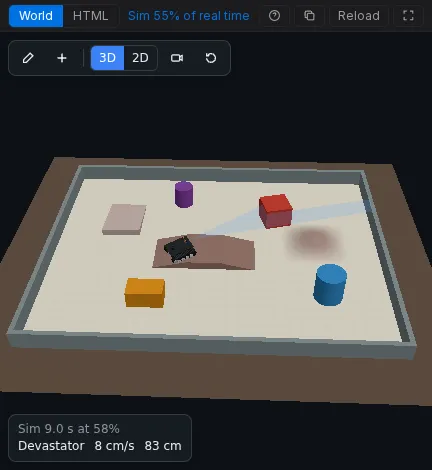
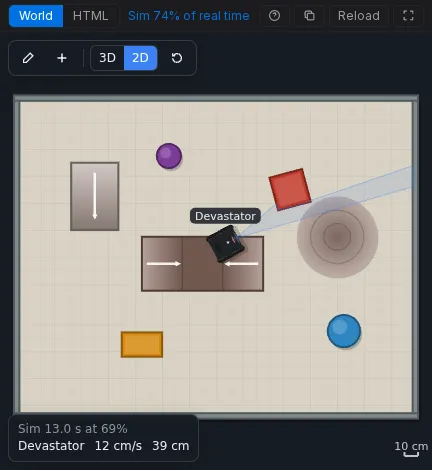
The DFRobot Devastator tank on a Romeo BLE runs DFRobot’s own obstacle-avoidance sample. It drives until the URM37 on its servo reads less than 35 cm, looks right and left, backs off, and turns toward the side with more room. The World is an arena with square and round obstacles, a bridge, a hill and a ramp, made with the scene kit, so you can edit it with the mouse.
Open it: velxio.dev/example/dfrobot-devastator-tank-avoidance and press Run.
| Id | Part |
|---|---|
dfrobot-romeo-ble |
DFRobot Romeo BLE (two motor channels on board) |
motorL, motorR |
Gear motor with encoder, 45:1 |
servo1 |
Servo that turns the sonar |
urm37 |
DFRobot URM37 V5.0 ultrasonic, PWM mode |
Wiring
Section titled “Wiring”| From | To (Romeo BLE) |
|---|---|
motorL M1 / M2 |
M1+ / M1- |
motorR M1 / M2 |
M2+ / M2- |
servo1 PWM / V+ / GND |
D10 / 5V / GND |
urm37 ECHO |
D8 |
urm37 TRIG (COMP/TRIG) |
D9 |
urm37 VCC / GND |
5V / GND |
Firmware
Section titled “Firmware”The sketch is DFRobot’s sample for the Devastator (Avoidance_URM37.ino, by
Gavin, 2015), with the two libraries it includes, DFMobile and URM37, as
files of the project. Only two things changed in the project’s copy: the line
endings, and the includes use quotes because the libraries ship next to the
sketch. The listing below shortens DFRobot’s comments.
#include "DFMobile.h"DFMobile Robot (4,5,7,6);   // left dir D4 / PWM D5, right dir D7 / PWM D6
#include<Servo.h>Servo myservo;
#include "URM37.h"ultrasonic URM37;double distance;int i=0;int distanceBuffer[3];
void setup(){  myservo.attach(10);  Robot.Direction(LOW,HIGH);   // (left direction, right direction)  Serial.begin (115200);  URM37.Init(8,9);             // ECHO on D8, COMP/TRIG on D9}
void loop(){  myservo.write(90);           // look ahead  Robot.Speed(80,80);          // forward  Measurement();
  if(distance < 35){    Robot.Speed (0,0);         // stop    myservo.write(0);          // look right    Measurement();    delay(200);    double degree_0 = distance;    delay(50);    myservo.write(180);        // look left    Measurement();    delay(200);    double degree_180 = distance;    delay(50);
    if(degree_0 > degree_180){      Robot.Speed(-200,-200);  // back off      delay(50);      Robot.Speed(200,-200);   // turn right      delay(200);    }    else{      Robot.Speed(-200,-200);  // back off      delay(50);      Robot.Speed(-200,200);   // turn left      delay(200);    }  }  else{    myservo.write(90);    Robot.Speed (100,100);     // forward  }}
void Measurement(){  distanceBuffer[i] = URM37.Distance();  i++;  if(i>2){    i=0;  }  // the largest of the last three readings  distance = distanceBuffer[0]>distanceBuffer[1] && distanceBuffer[0]>distanceBuffer[2]?distanceBuffer[0]:(distanceBuffer[1]>distanceBuffer[2]?distanceBuffer[1]:distanceBuffer[2]);  Serial.print(distance);  Serial.println (" cm");  delay (100);}
Robot.Direction(LOW, HIGH) makes “forward” a LOW direction level on both
sides, because the real chassis mounts its motors mirrored. The World says so
with Reverse on both sides of the tank (invertLeft and invertRight),
so the sketch stays exactly DFRobot’s.
The World
Section titled “The World”The scene (in world.html, editable with Edit):
{ "version": 1, "view": "3d", "floor": { "w": 3.0, "h": 2.4, "color": "#d8d2c4", "grid": true }, "objects": [ { "id": "wallN", "type": "wall", "x": 0, "y": 1.18, "rot": 0, "w": 3.0, "d": 0.04, "h": 0.15, "color": "#7f8c8d" }, { "id": "wallS", "type": "wall", "x": 0, "y": -1.18, "rot": 0, "w": 3.0, "d": 0.04, "h": 0.15, "color": "#7f8c8d" }, { "id": "wallE", "type": "wall", "x": 1.48, "y": 0, "rot": 90, "w": 2.32, "d": 0.04, "h": 0.15, "color": "#7f8c8d" }, { "id": "wallW", "type": "wall", "x": -1.48, "y": 0, "rot": 90, "w": 2.32, "d": 0.04, "h": 0.15, "color": "#7f8c8d" }, { "id": "box1", "type": "box", "x": 0.55, "y": 0.5, "rot": 15, "w": 0.25, "d": 0.25, "h": 0.2, "color": "#c0392b" }, { "id": "box2", "type": "box", "x": -0.55, "y": -0.65, "rot": 0, "w": 0.3, "d": 0.18, "h": 0.15, "color": "#d68910" }, { "id": "cyl1", "type": "cylinder", "x": 0.95, "y": -0.55, "r": 0.12, "h": 0.25, "color": "#2e86c1" }, { "id": "cyl2", "type": "cylinder", "x": -0.35, "y": 0.75, "r": 0.09, "h": 0.2, "color": "#7d3c98" }, { "id": "bridge1", "type": "ramp", "profile": "bridge", "x": -0.1, "y": -0.05, "rot": 0, "w": 0.9, "d": 0.4, "h": 0.07, "color": "#8d6e63" }, { "id": "hill1", "type": "ramp", "profile": "hill", "x": 0.9, "y": 0.15, "rot": 0, "w": 0.6, "d": 0.6, "h": 0.06, "color": "#a1887f" }, { "id": "ramp1", "type": "ramp", "profile": "wedge", "x": -0.9, "y": 0.45, "rot": -90, "w": 0.5, "d": 0.35, "h": 0.06, "color": "#bcaaa4" }, { "id": "tank1", "type": "robot", "preset": "tank", "label": "Devastator", "x": -1.05, "y": -0.3, "rot": 0, "color": "#1f2326", "bind": { "left": ["motorL"], "right": ["motorR"], "invertLeft": true, "invertRight": true, "sonar": "urm37", "sonarServo": "servo1" } } ] }- The URM37 looks where the servo points it:
sonarServoturns the sonar with the servo’s angle (0 degrees right, 90 ahead, 180 left). - The tank climbs up to 3 cm, so it drives over the bridge, the hill and the ramp, and stops against the boxes, the cylinders and the walls.
- Every gap between obstacles is wider than the 22 cm tank, so it never gets trapped.
Try next
Section titled “Try next”- Press Edit, move a box into the tank’s path, and watch it scan and turn.
- Change
35inloop()to20and see how much closer it gets before it looks around. - Add an MPU6050 to the circuit, bind it to the tank as its IMU in the editor, and read the turn rate in the sketch.