
Velxio CI
Velxio CI runs a project of yours on our simulator from outside the browser: your terminal, a GitHub Actions job, any CI that can run a binary. The board boots your real compiled firmware, the serial output streams back, and the command exits non-zero when something you asked for did not happen.
curl -fsSL https://velxio.dev/ci/install.sh | shvelxio-cli login # approve in the browser, oncecd firmware/blinkvelxio-cli run --expect-text "Hello, world!" --timeout 10000 .velxio-cli 0.2.1 · plan pro · 1998.3 of 2000 min left (resets 2026-10-01)project blink (esp32-s3, 4 parts) · firmware build/blink.bin (ESP32 image, 912 KB)run r_9f3c2a1b7e4d queued · budget 10.0 s simulatedHello, world!ok wait-serial "Hello, world!" at 0.412 sPASS in 0.41 s simulated (3.2 s wall) · billed 1 s · exit 0What it is for
Section titled “What it is for”- Catch a firmware regression before hardware does. A test that boots the binary and waits for a line of serial is one command; a test that presses a button, sets a sensor and checks a pin is a short YAML file.
- Test what you cannot keep on a desk. Every board Velxio simulates is available to every job, in parallel, with no lab and no flashing.
- Keep the toolchain you have. Compile with arduino-cli, ESP-IDF, PlatformIO or cargo in an earlier step; Velxio only runs what came out.
What it costs
Section titled “What it costs”CI is billed in simulated minutes: the time the guest firmware believes has passed, not how long our servers took. A 10-second test costs 10 seconds on every board, whether the emulator ran it faster or slower than real time.
| Plan | CI minutes per month | Jobs at once | Longest run |
|---|---|---|---|
| Free | none | none | none |
| Maker | 200 | 1 | 5 min |
| Pro | 2,000 | 2 | 10 min |
A run that never starts (an unknown board, a firmware that does not match the board, a rejected scenario) costs nothing. Minutes reset on the first of the month, UTC. Your balance, your run history and your tokens live at /account/ci:
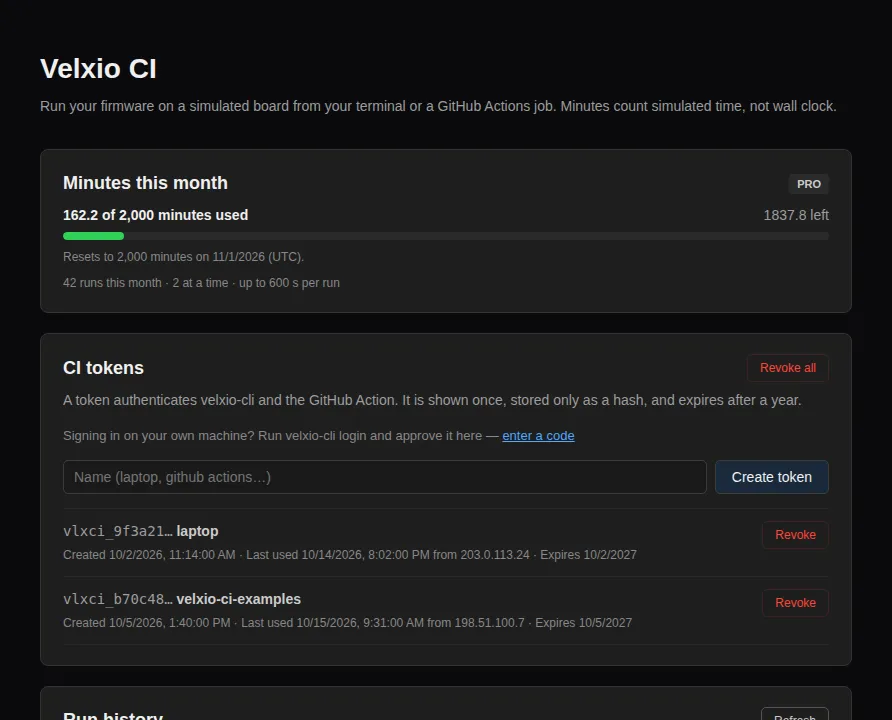
How a project describes itself
Section titled “How a project describes itself”Two files in the directory you point the CLI at:
velxio.toml: the board and the firmware. A Wokwiwokwi.tomlworks too.diagram.json: the circuit. Wokwi’s format, so an existing diagram runs unchanged.
Add scenario.yaml when a serial check is not enough: it can wait for text,
send text, wait on the simulated clock, check a pin and set a control on a
part. See Scenarios.
- Quickstart: a first passing run in five minutes.
- velxio.toml: every key, and how paths resolve.
- Scenarios: the steps and what they mean.
- GitHub Actions: the action and its inputs.
- Exit codes: what each one means for your job.
- Coming from Wokwi CI: what changes.