
教程:通过 I2C 读取温度和湿度
引脚上的电压是最简单的情况。真实的传感器通常使用协议通信,这改变了一件事:在哪里读取属性。本教程将构建一个位于 I2C 地址 0x44 的温度和湿度传感器,每个传感器配有一个滑块。
唯一不同的理念
Section titled “唯一不同的理念”在模拟传感器中,定时器每秒重新读取属性 20 次。这里没有定时器。主机决定何时进行读取,因此您需要在主机开始读取事务的那一刻采样属性。其他任何方式要么白白消耗 CPU,要么提供过时的值。
这就是 on_connect 的用途。
保持简单。两个 16 位小端寄存器,步进为 0.1 单位,带有自动递增指针:
| 寄存器 | 内容 |
|---|---|
0x00 |
温度,有符号 int16,单位为 0.1°C |
0x02 |
湿度,无符号 int16,单位为 0.1 %RH |
主机写入一个字节来设置指针,然后读取;指针自动递增,因此连续读取四个字节即可获得两个值。
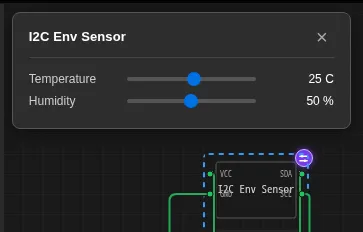
两个属性,两个控件。注意每个控件上的 type: "float" 和 unit,它们会显示在面板中数字的后面。
{ "schema": "velxio-chip/v1", "name": "I2C Env Sensor", "description": "Temperature + humidity over I2C (0x44) with live sliders.", "pins": ["VCC", "GND", "SDA", "SCL"], "attributes": [ { "name": "temperature", "label": "Temperature", "type": "float", "default": 25, "min": -40, "max": 85, "step": 0.5 }, { "name": "humidity", "label": "Humidity", "type": "float", "default": 50, "min": 0, "max": 100, "step": 1 } ], "controls": [ { "id": "temperature", "label": "Temperature", "type": "range", "min": -40, "max": 85, "step": 0.5, "unit": "C" }, { "id": "humidity", "label": "Humidity", "type": "range", "min": 0, "max": 100, "step": 1, "unit": "%" } ]}#include "velxio-chip.h"#include <string.h>
#define I2C_ADDR 0x44
typedef struct { vx_attr temp; /* degrees C */ vx_attr humidity; /* %RH */ uint8_t reg; /* register pointer */ uint8_t regs[4]; /* latched at the start of a read */} chip_state_t;
static chip_state_t S;
static void latch_registers(void) { /* Re-read the attributes NOW: the sliders may have moved. */ int16_t t = (int16_t)(vx_attr_read(S.temp) * 10.0); uint16_t h = (uint16_t)(vx_attr_read(S.humidity) * 10.0); S.regs[0] = (uint8_t)(t & 0xFF); S.regs[1] = (uint8_t)((t >> 8) & 0xFF); S.regs[2] = (uint8_t)(h & 0xFF); S.regs[3] = (uint8_t)((h >> 8) & 0xFF);}
static bool on_connect(void *ud, uint8_t addr, bool is_read) { (void)ud; (void)addr; if (is_read) latch_registers(); /* sample here, not on a timer */ return true; /* ACK the address */}
static uint8_t on_read(void *ud) { (void)ud; uint8_t v = S.reg < sizeof(S.regs) ? S.regs[S.reg] : 0xFF; S.reg++; /* auto-increment */ return v;}
static bool on_write(void *ud, uint8_t byte) { (void)ud; S.reg = byte; /* a write sets the pointer */ return true; /* ACK the byte */}
static void on_stop(void *ud) { (void)ud; }
void chip_setup(void) { S.temp = vx_attr_register("temperature", 25); S.humidity = vx_attr_register("humidity", 50);
vx_i2c_config cfg; memset(&cfg, 0, sizeof(cfg)); /* zero it: unset callbacks must be NULL */ cfg.address = I2C_ADDR; cfg.scl = vx_pin_register("SCL", VX_INPUT); cfg.sda = vx_pin_register("SDA", VX_INPUT); cfg.on_connect = on_connect; cfg.on_read = on_read; cfg.on_write = on_write; cfg.on_stop = on_stop; vx_i2c_attach(&cfg); vx_log("i2c env sensor at 0x44");}值得复制的要点:
- 对配置结构体使用
memset。 它是一个普通结构体;如果某个回调槽位未设置,残留的指针可能会被调用。 - 从
on_connect返回true,否则芯片会对其自身地址发出 NACK,主机将在总线上看不到任何内容。 - 在读取时锁存,而不是在每个字节时。 在
on_read内部采样可能会让温度在 16 位值传输中途发生变化,从而向主机提供撕裂的读数。
#include <Wire.h>
void setup() {  Serial.begin(115200);  Wire.begin();}
void loop() {  Wire.beginTransmission(0x44);  Wire.write(0x00);                 // point at temperature  Wire.endTransmission();
  Wire.requestFrom(0x44, 4);        // t_lo t_hi h_lo h_hi  if (Wire.available() >= 4) {    int16_t t  = Wire.read() | (Wire.read() << 8);    uint16_t h = Wire.read() | (Wire.read() << 8);    Serial.print("T="); Serial.print(t / 10.0, 1);    Serial.print("C  RH="); Serial.print(h / 10.0, 1);    Serial.println("%");  }  delay(500);}
将 SDA 和 SCL 连接到开发板的 I2C 引脚(Uno 上的 A4 和 A5),以及 VCC 和 GND。按下 Run(运行),点击芯片,然后拖动任一滑块:下一次事务将携带新值。
| 现象 | 几乎总是 |
|---|---|
requestFrom 无返回 |
on_connect 返回了 false,或者代码中的地址与 cfg.address 不匹配 |
| 读数停留在默认值 | latch_registers 是在 chip_setup 中调用,而不是在 on_connect 中调用 |
| 温度读数为巨大的正数 | int16 被当作无符号数扩展;在除法前保留 int16_t 强制转换 |
| 两次读数之间数值跳变 | 采样移到了 on_read 中,导致 16 位值的两个半部分来自不同的滑块位置 |
| 总线上完全无信号 | SDA 和 SCL 接反了,或者注册时使用的模式不是 VX_INPUT |
- 所有字段,以及自动回退机制:
controls参考。 - 完整的 C API,包括 SPI 和 UART 从设备: API 参考。