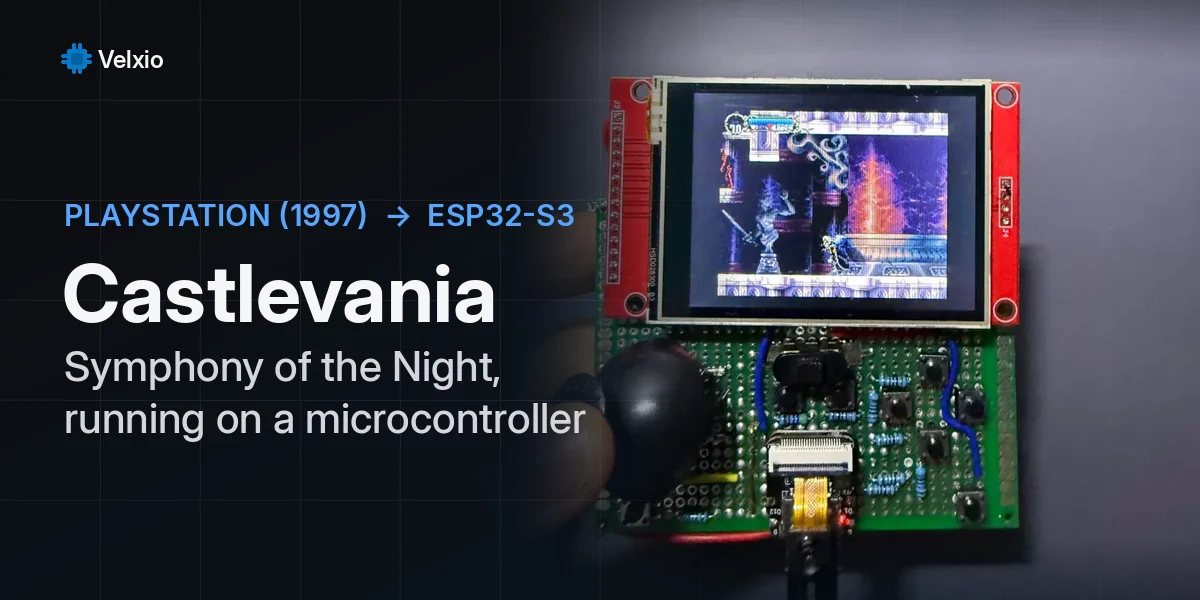
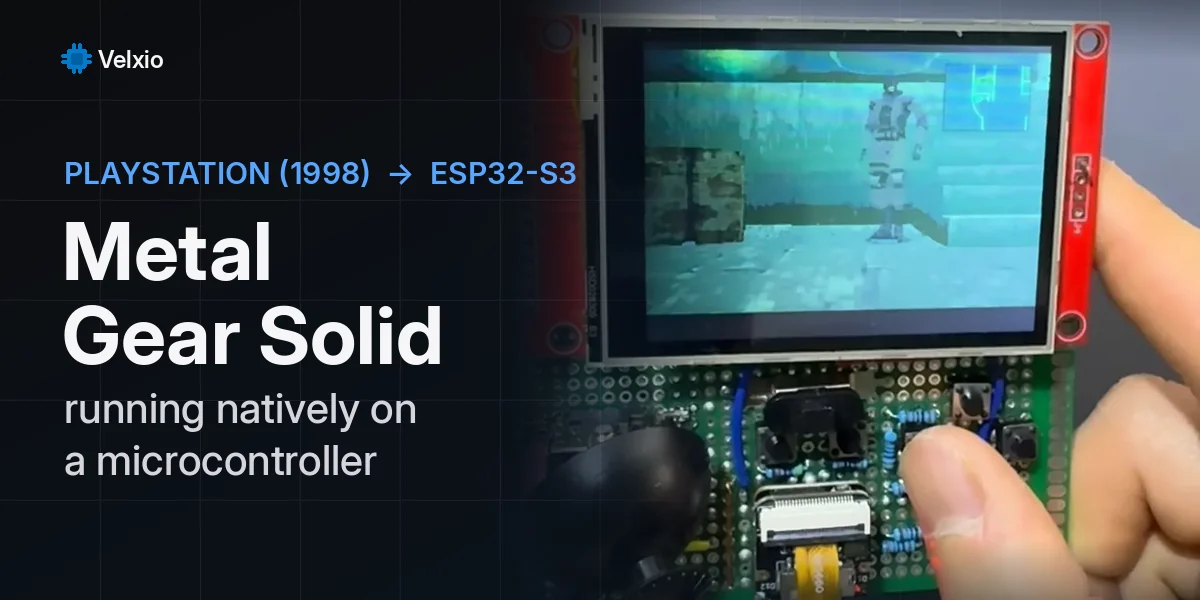
A 2.4-inch ILI9341 screen, a D-pad made of four push buttons and two more buttons for A and B: that is a handheld game console, and an ESP32 is more than enough to run it. We built five games for that layout, then a sixth, Skythread, for a bigger handheld with an analog stick, and put all six in Velxio’s example gallery. Each one is an Arduino sketch, and each one runs in your browser: press Run and play, no board, no screen, no soldering.
| Game | Board | Kind of game | Frame rate in Velxio |
|---|---|---|---|
| ESP32 Doom | ESP32 DevKit | first-person shooter | about 18 FPS |
| Sky Duel | Seeed XIAO ESP32-S3 | side-view dogfight | about 29 FPS |
| XIAO Quest | Seeed XIAO ESP32-S3 | top-down RPG | about 32 FPS |
| Gear Hop | Seeed XIAO ESP32-S3 | side-scrolling platformer | about 27 FPS |
| Circuit Defense | Seeed XIAO ESP32-S3 | tower defense | about 31 FPS |
| Skythread | Seeed XIAO ESP32-S3 Sense | 3D flight over a generated landscape | about 20 FPS |
The first one, Doom, came first and runs on the classic ESP32. The next four run on the Seeed Studio XIAO ESP32-S3, the thumb-sized board from our partner Seeed, and they share one small engine. The last one, Skythread, runs on the XIAO ESP32-S3 Sense, the same chip with 8 MB of PSRAM, which it needs to keep a whole landscape in memory. This article explains how each game plays and how it works inside.
How to play them in Velxio
- Open any game from the table above. The sketch, the libraries and the circuit load together.
- Press Run. Velxio compiles the sketch and starts it. The first compile of a sketch takes up to a minute; after that it comes from the build cache.
- Every game starts with an attract-mode demo that plays itself. Press any key or button to take over.
- Play with the keyboard: the arrow keys are the D-pad, Z is A and X is B. Each button on the canvas shows its key in a small keycap. You can also click the buttons with the mouse, and hold one down to keep it pressed. Skythread has an analog stick and more buttons; its controls are in its own section below.
- Open the Serial monitor to watch the game’s log: a
STATline with the frame rate, and anEVTline for every kill, level, pickup and death. Skythread prints its own line every two seconds, with the frame rate, the time each frame took to draw and to send, and the score.
Any push button in Velxio can be driven from the keyboard, not only these. Right-click a button and use the Keyboard control card: click it, press a key, and from then on holding that key presses the button while the simulation runs.
The simulator runs the firmware itself, compiled for the real chip: Velxio emulates the ESP32 and the ESP32-S3 instruction by instruction, in your browser, and draws whatever the sketch sends to the ILI9341.
The handheld
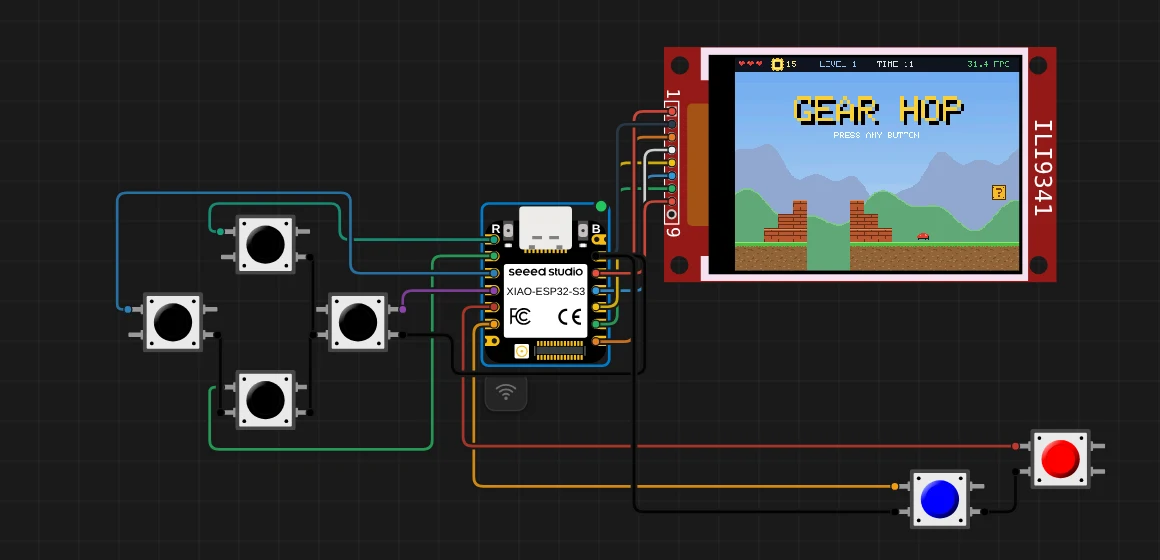
The XIAO has only 11 GPIO pins, and a screen and six buttons need twelve. The trick is that the screen does not need two of its usual lines: nothing is ever read back from it, so MISO stays unconnected, and its reset pin is tied to 3.3 V so it resets with the board. That leaves exactly enough.
| XIAO pin | Goes to | XIAO pin | Goes to | |
|---|---|---|---|---|
| D8 | screen SCK | D0 | D-pad UP | |
| D10 | screen MOSI | D1 | D-pad DOWN | |
| D7 | screen CS | D2 | D-pad LEFT | |
| D9 | screen D/C | D3 | D-pad RIGHT | |
| 3V3 | screen VCC, LED and RST | D4 | A | |
| GND | screen GND, all buttons | D5 | B |
Each button connects its pin to ground. The sketch turns on the chip’s internal pull-up resistors with pinMode(pin, INPUT_PULLUP), so a pin reads HIGH when the button is up and LOW when it is pressed. No resistors are needed, on the canvas or on a real breadboard. Doom uses the same idea on the bigger ESP32 DevKit, with its own pins (they are listed in its section below).
Why the XIAO ESP32-S3
The four XIAO games draw the whole picture into memory first and then send it to the screen in one go. A 320 x 240 picture at two bytes per pixel is 153,600 bytes, and it has to sit in one continuous block of RAM.
That is where the two chips differ. We printed the largest free block from a sketch on each one: 110,592 bytes on the classic ESP32 and 278,528 bytes on the ESP32-S3. The S3 can hold the whole frame with room to spare; the classic ESP32 cannot, which is why Doom draws its picture one column at a time instead (more on that below).
The S3 is also the faster of the two in the simulator. With the same frame-buffer benchmark on both boards, Velxio’s in-browser engine ran the ESP32 at 81 to 90 million instructions per second and the ESP32-S3 at 96 to 106 million, and the S3 pushed 33 full frames per second against the ESP32’s 31.
One engine for four games
The four XIAO sketches start with the same 200 lines: the engine. It owns the frame buffer, the buttons, a handful of drawing functions and the frame loop.
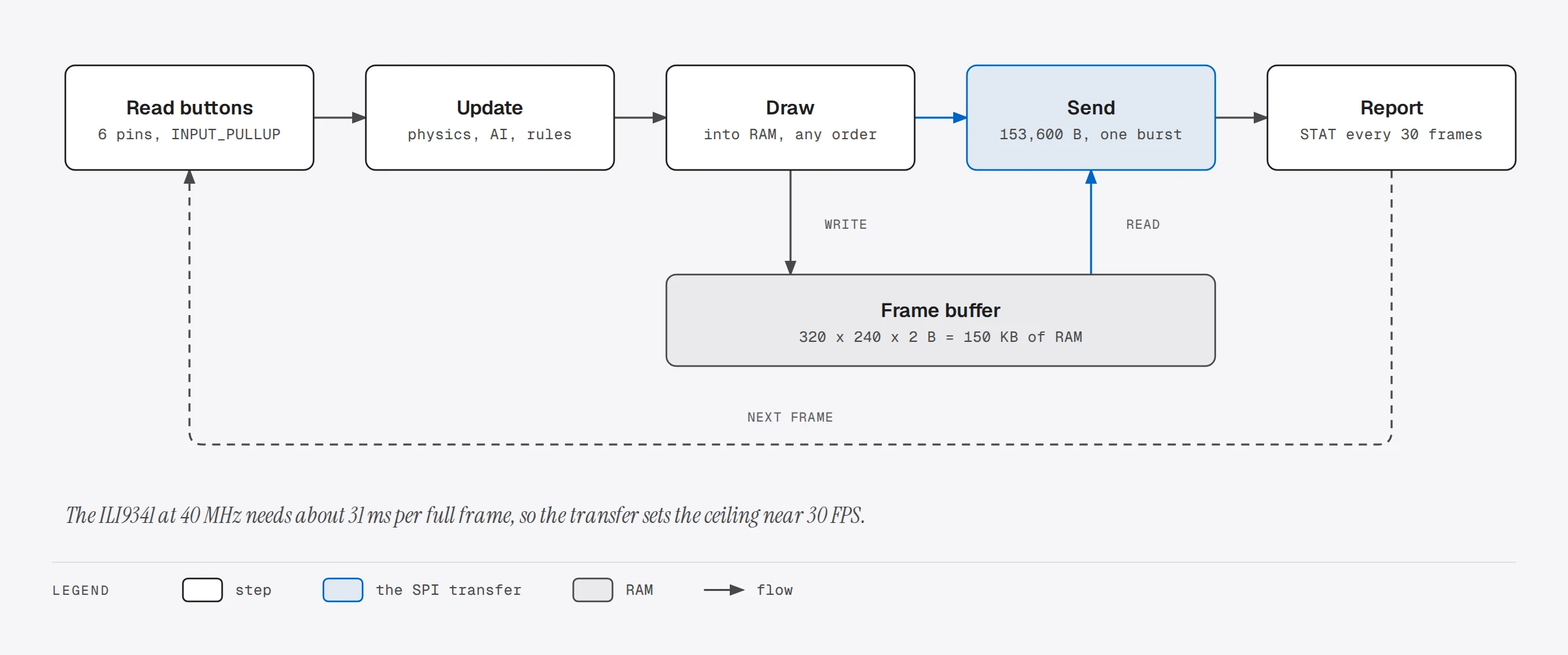
Drawing into RAM means the order does not matter. A game can paint the sky, then the hills, then the planes, then the explosions on top, and the screen only ever sees the finished picture, so nothing flickers. Sending it is three calls to the Adafruit ILI9341 library:
static void present() {
  tft.startWrite();
  tft.setAddrWindow(0, 0, SCR_W, SCR_H);  // the whole 320 x 240 screen
  tft.writePixels(fb, SCR_W * SCR_H);     // 153,600 bytes in one burst
  tft.endWrite();
}
At 40 MHz those 153,600 bytes take about 31 ms on the SPI wires, so the transfer alone sets the ceiling near 30 frames per second. The rest of the frame, the game logic and the drawing, has to fit in what is left, which is why the drawing functions are simple: filled rectangles, lines, circles, text in the 5 x 7 font that ships with Adafruit GFX, and sprites.
The sprites are written as text, one character per pixel, with . for transparent pixels and a 128-entry palette for the rest. This is the robot from Gear Hop:
"........a.......",
"....mmmmmmmm....",
"...mMMMMMMMMm...",
"...mMllMMllMm...",   // l = the eyes, light cyan
"...mMllMMllMm...",
"...mMMMMMMMMm...",
"....mmmrrmmm....",   // r = the red mouth
Nothing in these games comes from an image file. The map tiles, the textures and the effects are drawn by code into RAM when the board starts, so each sketch is plain text that you can read and change in the editor.
Sky Duel: a dogfight with a flight model
You fly a biplane over a world four screens wide that wraps around: fly off the right edge and you come back on the left. A red squadron hunts you, flak guns and trucks wait on the ground, and every wave brings one more enemy plane.
How to play. Point the D-pad where you want to fly, diagonals included; the plane turns toward that direction. Hold A for the machine guns and tap B to drop a bomb (six per wave). Bombs are the only way to destroy the ground targets. The radar at the top shows the whole world, so you can find the planes that are off screen.
How it works. The plane does not move at a fixed speed. Every frame the sketch runs a small flight model:
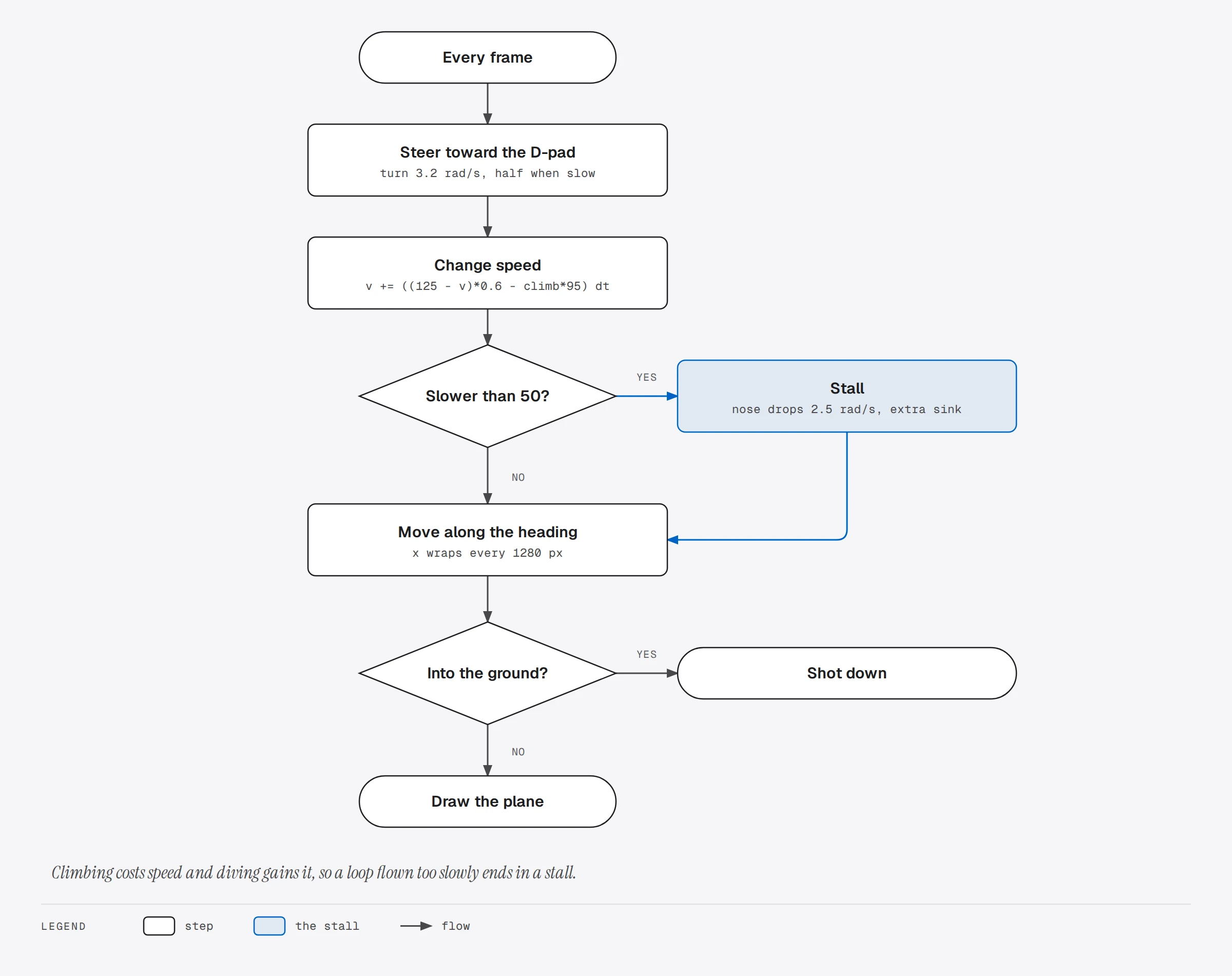
Speed drifts toward a cruising value, but climbing costs speed and diving gains it, in proportion to the angle. Pull straight up for too long and the plane drops below stall speed: the nose falls toward the ground on its own, and you have to dive to get flying again. The enemy pilots fly the same model, with the same stall, which is what makes it a dogfight rather than a shooting gallery.
The plane is one 16 x 16 sprite facing right. At boot the sketch rotates it into 32 headings and stores all of them, mirroring the ones that point left so the plane does not fly upside down. Drawing a plane is then a table lookup, scaled up twice on screen. The enemies steer toward a point just ahead of you, fire when you are in front of their guns, and break away after a close pass so they do not ram you.
XIAO Quest: a small RPG
A hero, a village, a forest and a cave. The elder by the fountain tells you that the Shade King took the village’s crystal into the old cave, and gives you the key to the gate that blocks the way. In the forest and the cave, monsters attack and you fight them in turns.
How to play. Walk with the D-pad. A talks to people, reads signs, opens chests and confirms; B shows your stats and items. The fountain heals you, the merchant sells potions for 10 gold, and three chests hold two potions, an iron sword and a silver ring. In a battle, choose with the D-pad and confirm with A: attack, cast fire (3 MP, double damage, ignores defense), drink a potion or run.
How it works. The game is a small state machine. Each state has its own input handling and its own drawing, and these are the events that move it from one to another:
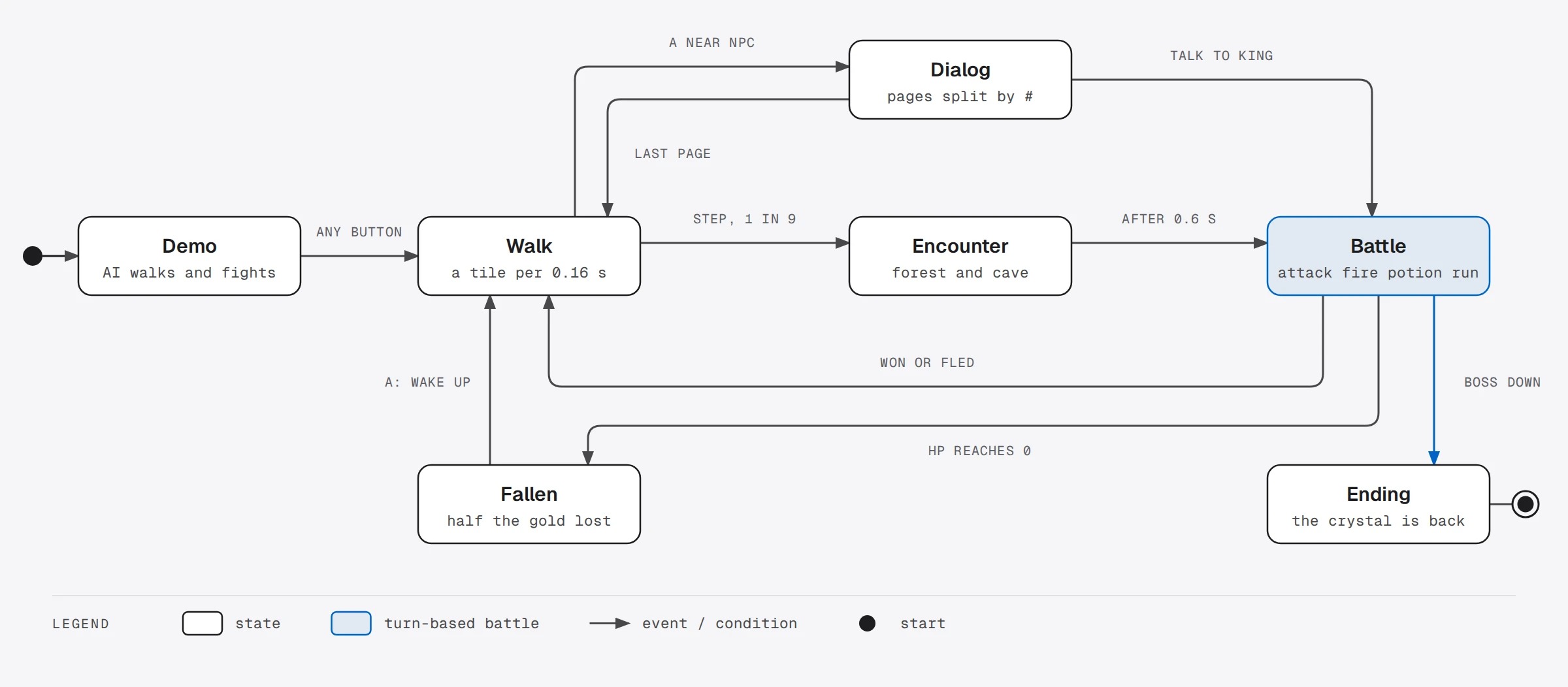
The three maps are 20 x 14 tiles of 16 pixels, written in the sketch as strings, one character per tile: # is a tree, ~ water, = a path, K the locked gate. The hero moves one tile at a time and slides between tiles over 0.16 seconds, so movement feels smooth but collisions stay simple: a step is allowed or it is not.
Battles use small whole-number formulas. An attack does your attack plus a roll of 0 to 3, minus the enemy’s defense. Experience brings levels, and each level adds health, magic, attack and defense. The cave is dark: after drawing the map, the sketch dims every pixel between 50 and 70 pixels from the hero to half brightness and everything farther to a quarter, so you carry a lantern. Measuring the distance of every pixel took the frame rate from about 27 down to 16. Working it out once per row instead, as a lit span, a dim span and a dark rest, brings it back to about 22.
Gear Hop: a platformer
A small robot runs through two levels collecting gears. Beetles walk the ground, drones float in the air, spikes line some floors, and the widest gaps can only be crossed on moving platforms. Reach the flag at the end of each level.
How to play. Walk with LEFT and RIGHT, hold B to run, press A to jump. Hold A longer for a higher jump. Land on an enemy to stomp it, and jump into a ? block from below to knock a gear out of it. You have three hearts; spikes and enemies take one, and so does falling into a pit.
How it works. The levels are 128 x 14 tiles, generated by a small script and pasted into the sketch as strings. The robot is a 10 x 14 pixel box, and every frame it moves in two steps: first sideways, pushed back out of any wall it ends up inside; then vertically, landing on the ground, on a one-way plank or on a moving platform, or bumping its head on a block. Doing the two axes separately is what keeps the robot from sticking to walls or sliding through corners.
Three small rules make the jumping feel right. A jump pressed up to 0.12 seconds before landing still happens when the robot touches down (a jump buffer). A jump pressed up to 0.08 seconds after walking off a ledge still counts (coyote time). And releasing A early cuts the upward speed, which is how holding the button gives a higher jump. Two layers of hills scroll at a fifth and at under half of the camera’s speed, which gives the scene depth.
Circuit Defense: tower defense on a circuit board
Bugs crawl across a circuit board toward the chip. You build electronic parts on the board to stop them: an LED fires a fast laser at one bug, a capacitor discharges into every bug around it, and a coil slows bugs down. Every bug that reaches the chip costs it a point of health, and the waves keep getting stronger.
How to play. Move the cursor with the D-pad. B chooses the part, A builds it, and A on a part you already built upgrades it, up to level 3. Destroyed bugs pay coins, and each wave cleared pays a bonus. The circle around the cursor shows the range of the part you are about to build.
How it works. The bugs do not follow a fixed track. They walk across open board, and you can steer them with what you build: the copper trace on the board is always the route they will take. Behind it is a breadth-first search, run again after every build:
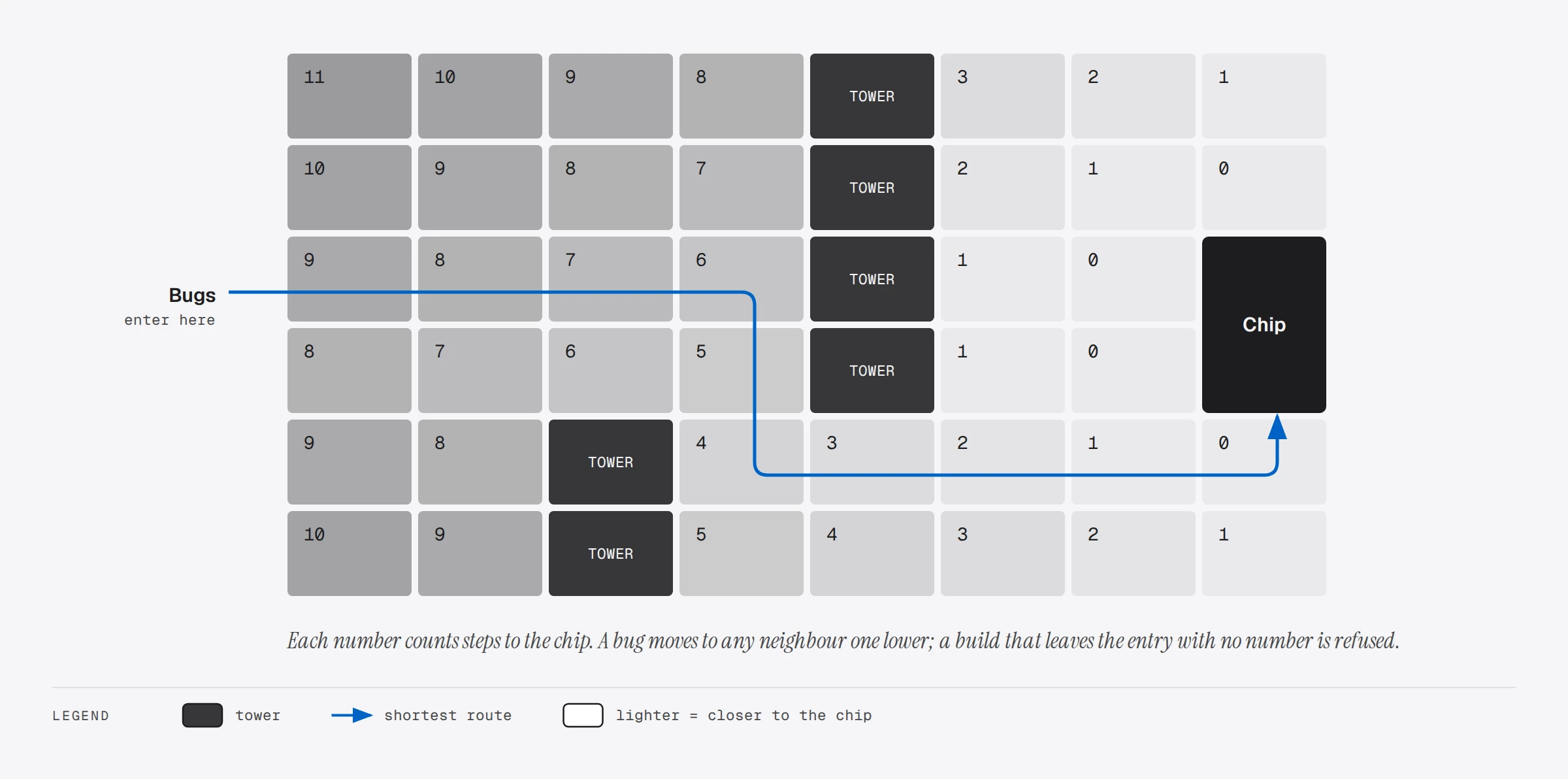
The search starts at the cells next to the chip, numbers them 0, and spreads outward: every free neighbor of a numbered cell gets that number plus one. When it is done, every cell holds its distance to the chip, walls of towers included. A bug standing on a cell just steps to any neighbor with a smaller number. There is no route planning per bug: one search, 260 cells, serves all of them.
The same numbers make the one rule of the game easy to enforce: you may lengthen the path, but never close it. When you build, the sketch puts the part down, runs the search again and looks at the entry cell. If it no longer has a number, the bugs could not get through: the part is removed and the game says THAT BLOCKS THE PATH.
ESP32 Doom: a first-person shooter
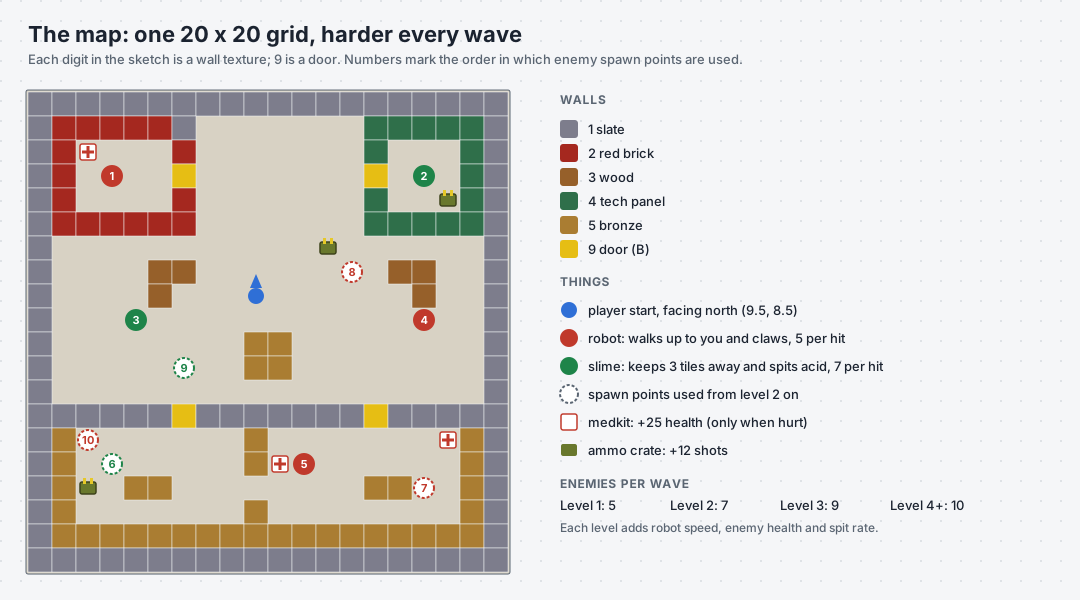
The oldest of the five runs on the classic ESP32 DevKit. You walk a maze of textured walls, shoot robots that chase you and slimes that spit acid, open doors, pick up medkits and ammo, and clear wave after wave.
How to play. The D-pad walks and turns, A fires (hold it for auto-fire), B opens the door in front of you, and B held with LEFT or RIGHT strafes. The pins are different from the XIAO games: UP on GPIO 32, DOWN 33, LEFT 25, RIGHT 15, A on 22, B on 21, and the screen on the ESP32’s VSPI bus (SCK 18, MOSI 23, MISO 19, CS 5, D/C 2, RST 4).
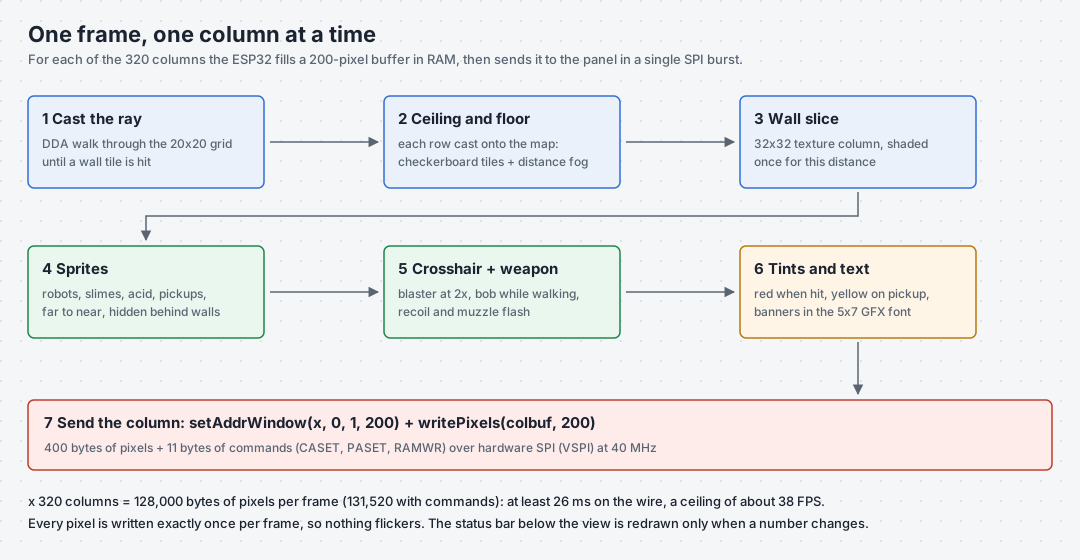
How it works. Doom is a raycaster, the technique of Wolfenstein 3D (1992): for every column of the screen it sends a ray from the player into a 20 x 20 grid map and stops it at the first wall. The distance sets how tall the wall slice is drawn. Since the classic ESP32 has no room for a full frame, the sketch builds one column at a time in a 200-pixel buffer, with the floor, ceiling, wall, enemies, weapon and effects already composed, and sends it as a single burst:
Robots walk straight at you and claw for 5 health per second; slimes keep their distance and spit acid that costs 7. A shot hits the nearest enemy under the crosshair, as long as no wall is closer. Every enemy cleared brings the next wave with two more of them, a little faster and a little tougher.
Skythread: 3D flight over a generated world
Doom is 3D indoors. Skythread is 3D outdoors: you fly a delta-wing glider low over open country, along river valleys, past mountains and over lakes, with fog toward the horizon and a sky that goes from day to golden hour to night. Rings hang in the air ahead of you, and the clock is running. You start with 45 seconds, and every ring adds a few more. Each ring in a row raises the combo, up to five times the points, and flying through the middle of a ring scores a PERFECT. Miss a ring and the combo starts over; touch the ground and you bounce off it, slower and three seconds poorer. Like the others, it starts with a demo that flies itself.
The handheld. Skythread was written for the handheld that runs our Metal Gear Solid and Castlevania ports, not for the D-pad layout of the other four: a Seeed Studio XIAO ESP32-S3 Sense, the same ILI9341 screen, a two-axis analog stick, two buttons on pins of their own and six more on a single pin. In Velxio the example opens laid out like that handheld: the stick on the left, the screen in the middle, the buttons on the right and under the screen.
| XIAO pin | Goes to | XIAO pin | Goes to | |
|---|---|---|---|---|
| D8 | screen SCK | D0 | stick X (left and right) | |
| D10 | screen MOSI | D1 | stick Y (up and down) | |
| D9 | screen MISO | D2 | six buttons, through a resistor ladder | |
| D3 | screen CS | D5 | FIRE | |
| D6 | screen D/C | D7 | BRAKE | |
| D4 | screen RST | 3V3, GND | power for the screen, the stick and the ladder |
How to play. Steer with the stick: click it on the canvas and use the arrow keys, or hold the mouse on one of its arrows. Pull back (down) to climb, push forward to dive, and left or right to bank and turn. FIRE (Z) is a boost that drains the blue bar, and also starts a game. BRAKE (X) slows you down for tight turns. START (Enter) starts and pauses, CROSS (C) also starts a game, SELECT (Q) goes back to the demo, CIRCLE (T) changes the time of day, TRIANGLE (W) builds a new world, and L1 (F) shows the frame rate.
Six buttons on one pin. The XIAO has 11 pins, and the screen, the stick and eight buttons would need 16. The trick for six of the buttons is a resistor ladder. A 10 kΩ resistor pulls D2 up to 3.3 V, and each button connects D2 to ground through a different resistor, so each one forms a different voltage divider. The pin reads 3.3 V × R / (R + 10 kΩ):
| Button | To ground through | Expected | Measured in Velxio |
|---|---|---|---|
| CIRCLE | 0 Ω | 0 V | 0 mV |
| CROSS | 2.2 kΩ | 0.595 V | 612 mV |
| TRIANGLE | 4.7 kΩ | 1.055 V | 1065 mV |
| L1 | 10 kΩ | 1.650 V | 1651 mV |
| START | 22 kΩ | 2.269 V | 2258 mV |
| SELECT | 47 kΩ | 2.721 V | 2665 mV |
The sketch reads D2 with analogReadMilliVolts() and picks the button whose voltage is nearest, with thresholds halfway between neighbors (300, 824, 1350, 1960, 2496 and 2960 mV). Velxio solves the ladder as a real circuit: the last column is what the sketch printed on the serial monitor when we pressed each button on the canvas. A ladder reads one button at a time, since two pressed together look like a single button with a smaller resistor. That is why the game keeps FIRE and BRAKE, the two you hold while flying, on pins of their own. It also ignores the ladder until it has seen it released once, so a D2 left unconnected can never press phantom buttons.
How it works. The world is generated when the board starts: a 512 x 512 map of the landscape made with diamond-square noise, where each cell takes two bytes, one for the height and one for a colour from the palette. With a half-size copy for the far distance and two frame buffers, that is about 940 KB, which is why Skythread needs the Sense and its PSRAM. In Velxio the world takes 3 seconds of simulated time to build, and the first frame reaches the screen 3.4 seconds after power-on.
Drawing uses the column ray casting of the early-1990s voxel flight games. For each column of the screen, the sketch walks a ray from the camera out over the map, from near to far, up to 160 steps and 340 cells away; after 110 cells it reads the half-size map instead. At each step it turns the terrain height there into a row on the screen. If that row is higher than anything drawn so far in the column, it fills the gap with the colour of that cell and remembers the new top:
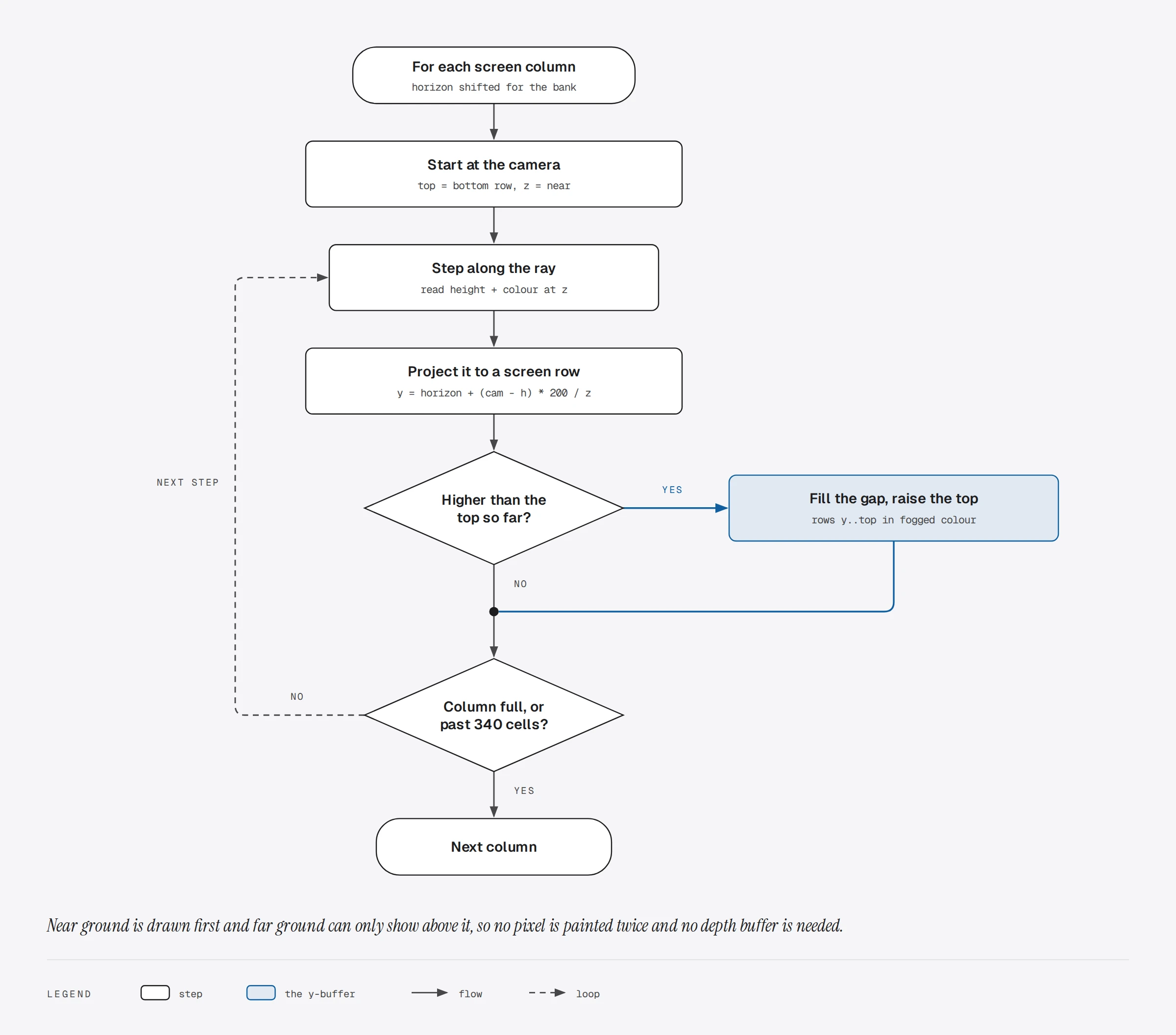
That remembered top per column is called a y-buffer. Near ground is always drawn first, so far ground can only show above it, and no pixel is ever painted twice. Fog is 20 palettes, each blended a bit more toward the sky colour, one per band of distance. Banking is a shear: each column’s horizon moves up or down in proportion to its distance from the centre of the screen, which looks like a roll. The rings, the glider’s shadow and the sun are checked against the same y-buffer at their own distance, so a mountain in front of a ring hides it.
The frame is stored column by column, already in the byte order the ILI9341 expects. In the panel’s own portrait addressing, a column of the landscape picture is one of its rows, so the whole frame goes out in one burst. With two frame buffers, the chip’s two cores work at the same time: a task on core 0 sends one frame to the screen over SPI at 40 MHz while core 1 draws the next.
The sketch also watches its own speed. When drawing a frame takes more than 22 ms on average, it casts 160 rays instead of 320 and draws each column two pixels wide, and it goes back to full width below 7 ms. Past 45 ms, a case its comments reserve for a slow host such as a browser simulator, it stops overlapping the two cores and waits for each frame to finish going out before drawing the next, so the simulated panel always receives whole frames. In Velxio it ran in that mode the whole time, at 160 columns, drawing each frame in 33 to 50 ms of simulated time.
Frame rates
We measured every game on velxio.dev in a headless Chrome browser on our server, playing for about a minute each.
| Game | Reported by the sketch (median, range) | Frames per second of real time |
|---|---|---|
| ESP32 Doom | 17.6 (13 to 24) | 16.1 |
| Sky Duel | 28.9 (23 to 38) | 27.2 |
| XIAO Quest | 32.2 (21 to 39) | 30.8 |
| Gear Hop | 27.0 (21 to 35) | 23.4 |
| Circuit Defense | 31.3 (23 to 40) | 29.4 |
| Skythread | 20.4 (16 to 23) | 17.7 |
Two numbers per game. The first is what the game itself reports on the serial monitor, from the chip’s own millis(): the frame rate of the simulated board. The second is how many frames the browser actually showed per second of real time. They differ when the computer running the simulation cannot keep the simulated chip at full speed; the simulated time then runs a little slower than the clock on the wall. Your own numbers depend on your computer.
The four 2D XIAO games run at close to twice Doom’s frame rate. Part of that is the work: a raycaster casts 320 rays and works out the floor and ceiling pixel by pixel. Part of it is the transfer: one burst per frame instead of 320 small ones, each with its own address window. Skythread, the only one that draws a 3D landscape, holds about 20 frames per second by casting 160 rays instead of 320, the trade its own code makes whenever a frame takes more than 22 ms to draw.
Make them your own
Each game is one sketch, and the code is organized in blocks: the engine, the art, the game state, the update and the drawing. Some changes that take a minute:
- Sky Duel: change the cruising speed (125) or the stall speed (50) in
fly()and feel how the plane changes. - XIAO Quest: the maps are the strings in
MAP_V,MAP_FandMAP_C; the monsters’ numbers are in theFOEStable. - Gear Hop: the jump strength is
-335inmovePlayer(), gravity is950; try the moon. - Circuit Defense: add a fourth part to
TW_NAME,TW_COSTandupdateTowers(). - Doom:
MAP_SRCis 20 strings of 20 digits; each digit is a wall texture, and a 9 is a door. - Skythread:
WORLD_SEEDat the top of the sketch picks the world you boot into, andPITCH_PULL_TO_CLIMBset to 0 makes the stick climb when you push it forward.
Press Run after an edit and Velxio compiles the changed sketch, so you can change a number and see the result a few seconds later. When it works the way you like, the same sketch runs on a real XIAO ESP32-S3 with an ILI9341 and six buttons wired as above, and Skythread on a XIAO ESP32-S3 Sense with the stick and buttons from its section.