On 8 September, Seeed Studio announced three new gadgets: a 0.96 inch, a 1.14 inch and a 1.47 inch IPS display, each one a carrier board with a XIAO nRF52840 Plus already soldered to it. Screen, buttons, a 6-axis IMU, a microphone and a battery connector, in something that sits on a fingertip.
They are in Velxio now. You can open one, press Run, and watch Seeed’s own demo firmware draw on the glass — without ordering a board, and on the free plan. The board on the canvas is drawn the way Seeed photographs it, front and back: the glass, the USR buttons and the microphone on one face; the XIAO nRF52840 Plus soldered on, the battery socket, the power switch, the card slot or the Grove port, and the pads you can wire, on the other.
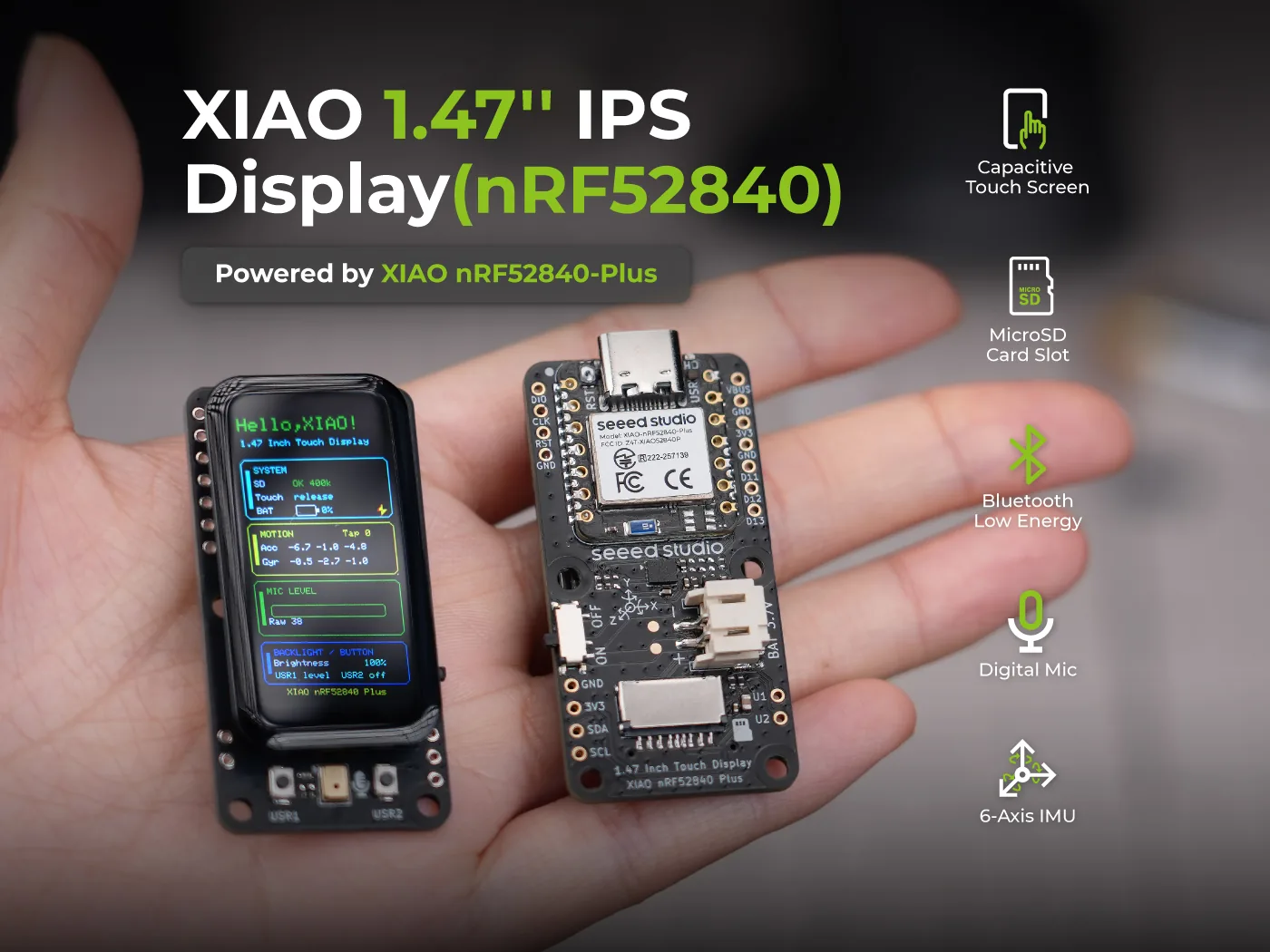
The three boards
All three carry the same computer — a XIAO nRF52840 Plus — and the same sensors around it: a 6-axis IMU, a PDM microphone, Bluetooth Low Energy and a JST battery connector with charge sensing. What differs is the glass and what Seeed put around it.
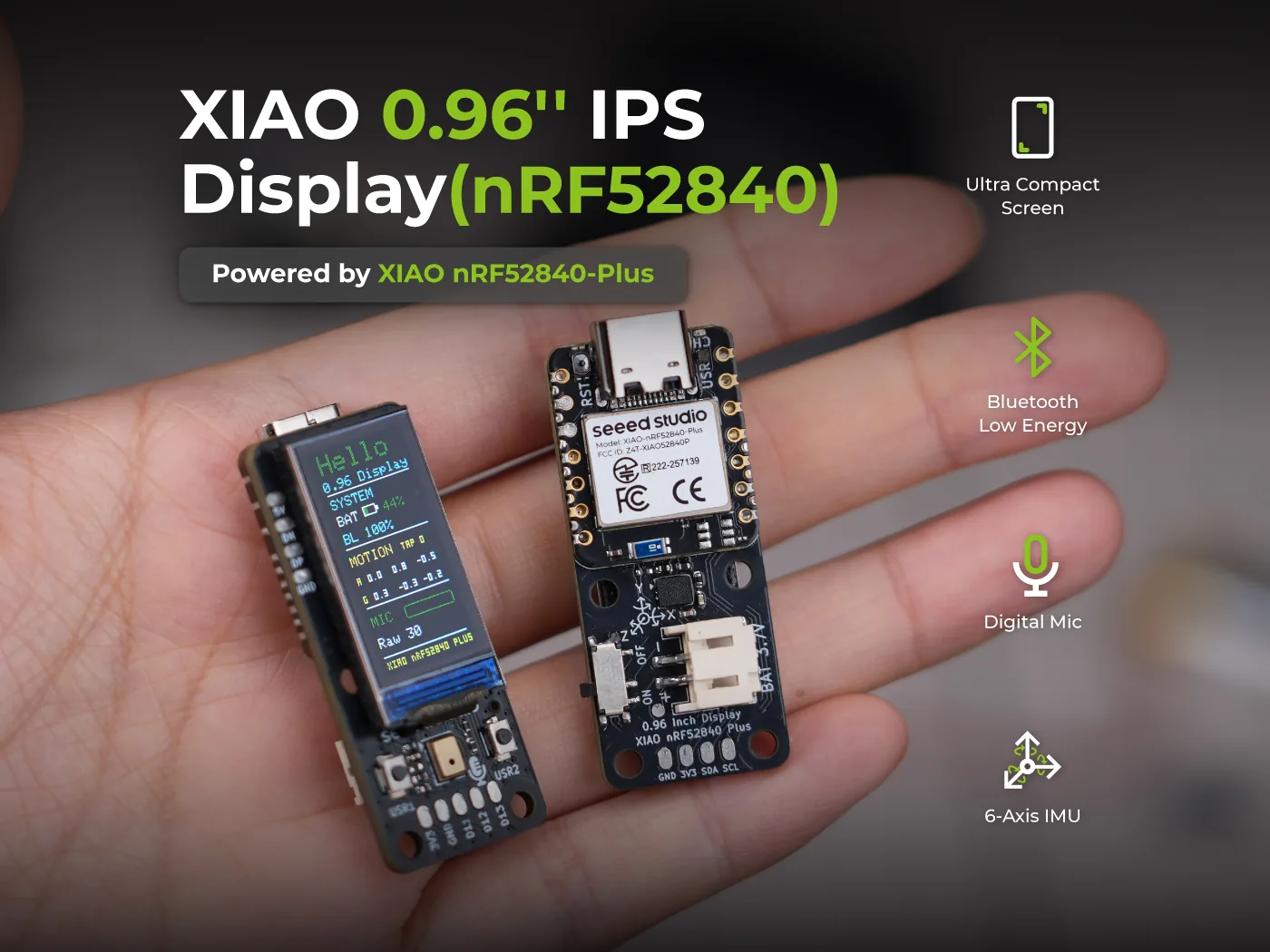
XIAO 0.96” IPS Display — an ST7789 panel, 80 x 160, with two user buttons. The small one: a status readout, a wearable, anything that needs a line of text and a number.
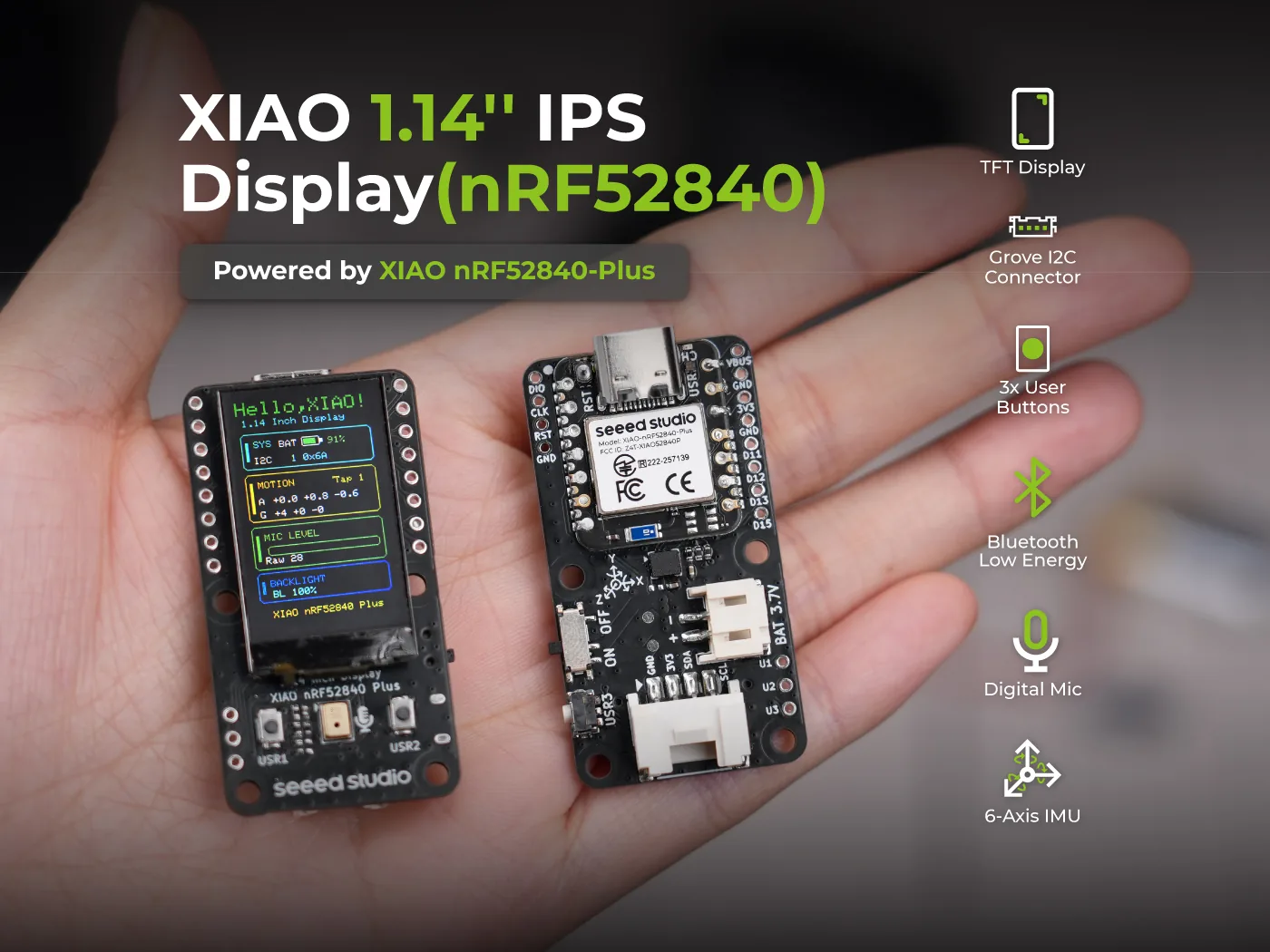
XIAO 1.14” IPS Display — an ST7789 panel, 135 x 240, three user buttons and, unlike the other two, a Grove I2C connector. That connector is the reason this is the one to pick if you want to hang a sensor off it.
XIAO 1.47” IPS Touch Display — a JD9853A panel, 172 x 320, with a capacitive touch layer and a microSD slot. The flagship, and the one with the most going on inside.
What the browser actually draws
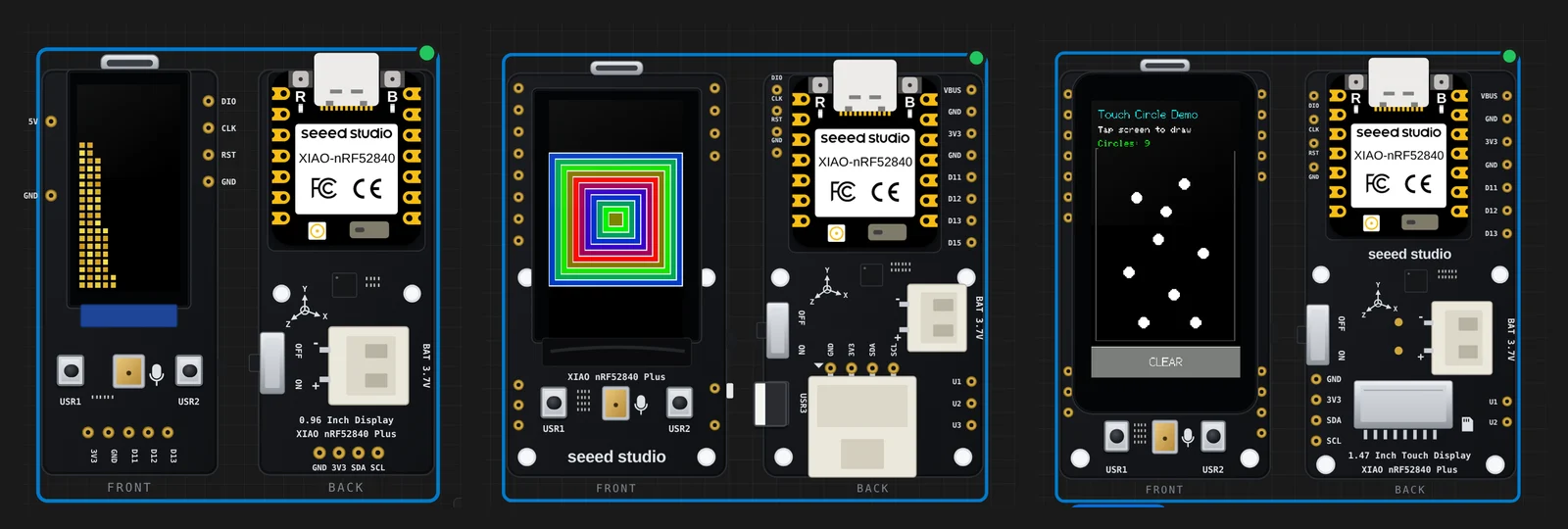
Those three pictures are not mock-ups. Each one is the frame buffer of an emulated display controller, filled by Seeed’s own compiled firmware.
The chain is worth spelling out, because it is the whole point. Your
sketch is compiled by a real arduino-cli with Seeed’s own nRF52 core,
for the board’s own FQBN. The resulting firmware is executed instruction
by instruction by a new in-browser nRF52840 engine — the same kind of
engine that already runs the ESP32 and RP2040 boards in Velxio. The
firmware brings up the SPI peripheral and starts shifting out bytes; a
model of the ST7789 reads the chip-select and data/command lines off the
pins on every byte and decodes what it is being told to do. What you see
on screen is the contents of that controller’s memory.
Nothing is intercepted at the library level. If you replace Seeed’s graphics library with your own SPI writes, the panel still draws.
Start with the graphic test
- Open velxio.dev/example/xiao-114-graphictest. You do not need an account.
- Press the play button on the toolbar. The sketch compiles on Velxio’s servers — the first build of a new library takes a couple of minutes, later ones are quick — and then the board boots.
- Watch the panel run through ten drawing primitives: colour bars, lines, rectangles, circles, triangles, text, a pixel gradient. The serial monitor at the bottom prints how long each one took, exactly as it does over USB on the bench.
- Then change something. Swap a colour, add a
fillCircle, run it again.
Tilt it, tap it, put a file on the card
The panel is the hard part, but it is not the interesting part. What makes these boards worth simulating is everything else on them, and all of it is wired to something you can move with the mouse.
The IMU. Seeed’s Electronic Quicksand demo drops a few hundred grains of sand and lets them fall whichever way the board is tilted. Press Sensors on the canvas toolbar, drag the dot on the Tilt pad, and the sand runs into the corner. The LSM6DS3TR-C answers on I2C at its real address and at the sensitivity its datasheet specifies, so the numbers the sketch converts are the numbers the part would give it. The same pad now drives the IMU on the bare XIAO nRF52840 Sense, MG24 Sense and nRF54L15 Sense, which carry the same part.
The touch glass. On the 1.47 inch board, the capacitive controller answers the same 14-byte report Seeed’s driver reads, with its interrupt line pulled low while a finger is down. Draw on the panel with the mouse and the circles land where you clicked.
The microSD slot. The card and the panel share one SPI bus on the real board, told apart by their chip selects, and they share it here too. Your project’s files are on the card when the sketch mounts it, and you can drop your own in through the board’s SD Card panel.
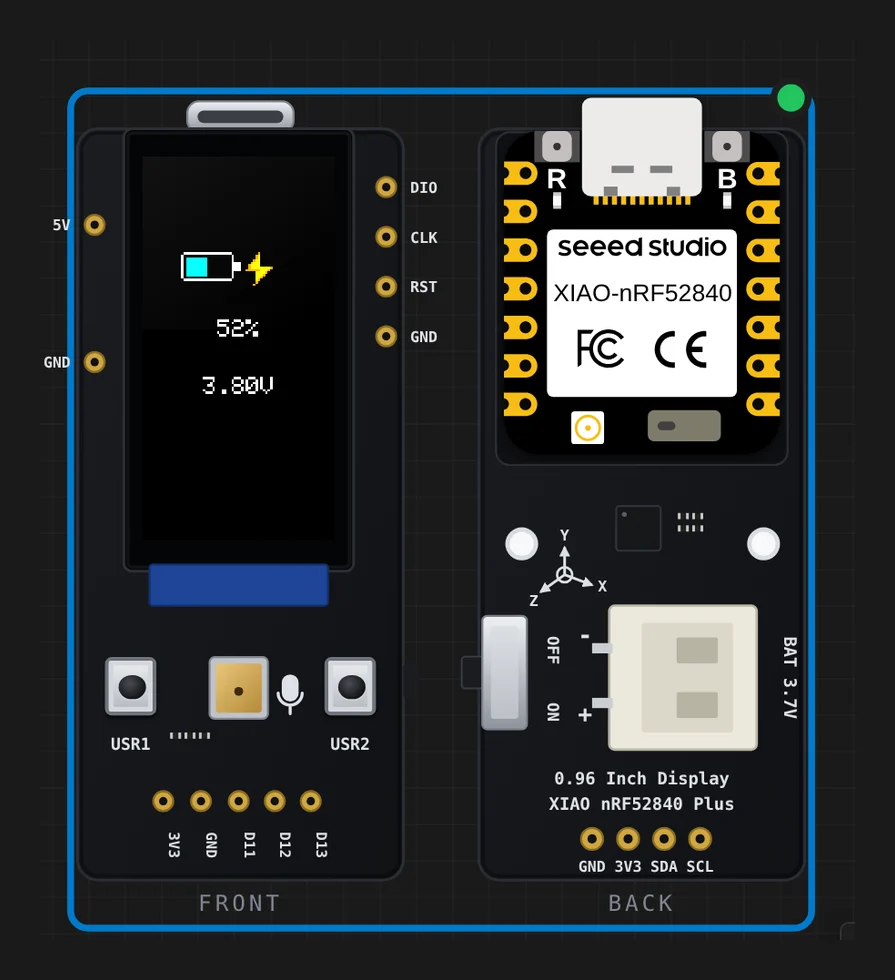
The battery. This one is the nicest surprise. Seeed’s battery demo does not trust a static voltage — on USB, the charger’s own node can look like a cell — so it learns a USB-only baseline first and only declares a battery present after a sustained drop. Move the battery slider in the same Sensors panel down a tenth of a volt and watch the sketch’s state machine make up its mind.
What running the vendor’s code turned up
Fourteen of the fifteen gallery examples are Seeed’s own files, changed in
only two ways: the porting note at the top becomes a short header saying where
the sketch came from, and one #include that the core already provides is
removed. Running them found two real problems in Seeed_GFX2 1.0.0, the
graphics library these boards ship with.
It does not build on a case-sensitive filesystem. The library’s
product catalogue includes XIAO_ePaper_Boards.h and
reTerminal_ePaper_Boards.h, while the files are spelled EPaper — and
each of those two headers then names its own config header the same wrong
way, so the second pair only surfaces once you have fixed the first. Four
#include lines in three files. On macOS and Windows that resolves; on
Linux — which is what a compile farm runs — every sketch that touches the
library stops with “No such file or directory”. It is still on upstream’s
main branch today. Velxio repairs the four lines when it fetches the
library, so the examples build.
The 1.14 inch panel config has the colour order wrong. The library configures that board as RGB; the panel is wired BGR. Seeed know — their own demos for the board carry a sketch-local override with the comment “the panel is physically wired for BGR color order” — but the library’s own config has not caught up, and you can see the consequence in Seeed’s own recording of their graphic test on the wiki: the first colour bar is drawn red and comes out blue, and the one drawn yellow comes out cyan.
That second one changed how Velxio models the panel. A display model that carries a fixed “swap red and blue” flag cannot reproduce this, because the swap is not a property of the panel alone — it is what you get when the panel’s wiring and the controller’s colour-order bit disagree. So Velxio models the two separately and lets them cancel. A sketch that uses Seeed’s override renders correctly; a sketch that takes the library at its word shows the same red-and-blue swap it would show on your desk. The same correction applies to display inversion, which is how that board’s black backgrounds stopped coming out white.
What is not modelled
Being straight about the gaps, because a simulator that quietly does nothing is worse than one that says so:
- The PDM microphone and the I2S output pads. Nothing on the canvas feeds them, so Seeed’s voice-bar and recorder demos are deliberately not in the gallery rather than in it drawing a flat line.
- Bluetooth. The nRF52840’s radio is out of scope for this engine.
- Raise to Wake, Seeed’s other IMU demo, needs the IMU’s wake interrupt and the chip’s System ON sleep. Neither is modelled yet.
Every example in the gallery
XIAO 0.96” IPS Display
XIAO 1.14” IPS Display
- GraphicTest
- Grove SHT31 on the I2C connector
- The three user buttons
- Battery status
- Electronic Quicksand (the IMU)
XIAO 1.47” IPS Touch Display
- GraphicTest
- Touch Circle
- Read text off the microSD
- Battery status
- Electronic Quicksand (the IMU)
- The panel demo
- LCD-only diagnostic
The boards are on Seeed’s store — the 0.96 inch, the 1.14 inch and the 1.47 inch Touch — and the demo sketches are in Seeed-Projects/Display-Gadgets. Try them here first; the sketches move either way unchanged.
Board photographs courtesy of Seeed Studio.